






Monday, 23 November 2026 12:00 PM
Product Announcements
The Innova-521MRS is a Voice-Assisted Accessibility Camera, and Vadzo Imaging is positioning it on an AR0521 5MP monochrome GigE sensor for visual content capture in self-service and assistive kiosk applications. A kiosk that speaks to a user who cannot read its screen still needs eyes. Something must look at the ticket, the form, the product label, or the card the user holds up, and turn what it sees into text that a speech system can read aloud. The camera does the seeing, and software does the reading and the speaking. The Innova-521MRS captures clean grayscale images with 2.2-micron back-illuminated pixels, strong low-light performance, line-interleaved HDR processing, and Full HD capture at up to 60 frames per second. GigE with PoE, ONVIF, IEEE 1588 PTP, GPIO triggering, and an operating range of minus 40 to plus 85 degrees Celsius make it suitable for real kiosks. As a 5MP Monochrome Ethernet Camera and an AR0521 Mono GigE Camera, it supplies clear images of printed content.
FORT WORTH, TX / ACCESS Newswire / November 23, 2026 / Vadzo Imaging, a provider of embedded vision camera products for OEMs and system integrators, today positions the Innova-521MRS as a Voice-Assisted Accessibility Camera for visual content capture in self-service and assistive kiosk applications. Built on the Onsemi AR0521 sensor and part of Vadzo's network camera portfolio, it combines monochrome output, strong low-light performance, line-interleaved HDR processing, GigE with PoE, ONVIF, PTP, and GPIO triggering. Vadzo presents a 5MP Monochrome Ethernet Camera and an AR0521 Mono GigE Camera for kiosk makers, with guidance on text capture, glare, and triggering.
Why a Voice-Assisted Accessibility Camera Must Capture Clean Images of Printed Content
Self-service machines are everywhere, in transit stations, banks, clinics, shops, and government offices, and many of them assume that the user can see a screen and touch a glass panel. People who are blind or have low vision cannot rely on either. Accessibility rules in many countries, such as the Americans with Disabilities Act in the United States, ask the owners of such machines to provide alternatives, and a voice that reads the content and guides the user is the most common one. The machine must then get the content into a form that a voice can read.
Some of that content is already digital. A great deal of it is not. A user holds up a boarding pass, a prescription label, a utility bill, a product package, or an identity card, and the kiosk must read what is printed on it. A camera captures the image, text recognition software turns the image into characters, and a speech system speaks them. Each step depends on the one before it. If the image is blurred, shadowed, or washed out by glare, recognition fails or guesses, and a voice that confidently reads a wrong amount or a wrong date does more harm than silence.
Kiosks are poor places for photography. Overhead lights reflect from glossy paper and plastic cards. A user's hand moves while it positions the item. Outdoor machines face sun, shade, and night, and some face winter cold and summer heat. The user cannot see the camera view and cannot tell whether the item is in the right place, so the system must guide the user by voice, and it must capture the moment that the item is in place, not a moment earlier or later.
Installation matters as well. Kiosks are built in volume and serviced in the field, so cabling, power, and standard software matter. A camera that needs a separate power supply, a custom driver, and hand-tuned settings multiplies the cost of every unit. Teams that choose a camera for one need and discover the others after the enclosure is built must reopen the design, and a clear view of the whole chain at the start saves that rework.
How a Voice-Assisted Accessibility Camera Turns Printed Items into Readable Images
The Innova-521MRS is built on the Onsemi AR0521, a 5MP (2592 x 1944) monochrome rolling shutter sensor with a 1/2.5 inch optical format and 2.2 micron pixels, built with back illumination. A monochrome sensor has no color filter array, so more light reaches each pixel, and no interpolation softens the edges of small characters. Text recognition works on brightness and shape, so it gains nothing from color and gains clarity from the absence of the filter. A short calculation shows what 5MP offers. If the camera views a field 100 millimeters wide across 2592 pixels, each pixel covers about 39 microns, and printed characters of 6-point size, about 2.1 millimeters tall, span about 54 pixels, far more than the 20 to 30 that most recognition software needs. A field of 297 millimeters, the long side of an A4 page, gives about 115 microns per pixel, and the same small print spans only about 18 pixels, which is borderline. A kiosk should therefore size its capture field to the items it expects.
Glare is the usual enemy. A glossy ticket or a plastic card reflects an overhead lamp as a bright patch that hides the characters beneath it. Line interleaved HDR processing, which the brief lists for this camera, alternates two exposure settings across the rows of one frame and combines them, so a bright reflection and a dark background can both stay readable, at the cost of some vertical detail where both exposures are needed. Optical measures help just as much. Diffuse lighting, a matte background, a slight tilt of the card holder, or a polarizing filter reduce reflections before they reach the sensor. A kiosk designer should combine these steps and should test with the glossiest items the machine will see.
Motion is the second enemy. A hand that moves at 0.2 meters per second travels 1 millimeter in an exposure of 5 milliseconds, which at 39 microns per pixel is about 26 pixels of blur, enough to defeat recognition. Two remedies work together. The first is a short exposure with good lighting. The second is a trigger that fires only when the item is at rest. GPIO for an external trigger lets a sensor in the holder, such as a switch or an infrared beam, tell the camera that the item has arrived, and the system can wait a short moment for the item to settle. The figures are illustrative, and teams should test with real users, since people hold items in many ways.
The brief lists Full HD capture at up to 60 frames per second, ONVIF compliance, and GigE with PoE. An uncompressed Full HD frame at 8 bits per pixel and 60 frames per second would need about 1.0 gigabit per second, which is more than a gigabit link carries in practice, so network video from an ONVIF camera is normally compressed, and teams should confirm the output formats of this camera. PoE at 802.3af delivers about 12.95 watts at the device over the same cable that carries the data, which gives a single-cable installation. IEEE 1588 PTP aligns the camera clock with a network time source, which helps when a kiosk keeps audit logs or uses more than one camera, for example, one for the document and one for the face. Teams should confirm the PTP profile and the timestamp method.
Temperature and lenses complete the picture. The brief gives an operating range of minus 40 to plus 85 degrees Celsius, which suits outdoor and enclosed kiosks, and teams should confirm the range in the product documentation. Sensor noise grows with temperature, so a hot enclosure raises the noise in dim scenes, and the design should keep the camera as cool as the enclosure allows. An S-Mount lens holder accepts a wide choice of M12 lenses, and the lens option is interchangeable, so a kiosk maker can choose the field of view, the aperture, and the working distance for the item that the machine reads. A lens with good contrast at the pixel scale matters as much as the sensor.
Focus deserves a worked example, since a kiosk camera usually has fixed focus. Suppose the camera views a field 100 millimeters wide from a working distance of 250 millimeters. The 2592 pixels at 2.2 microns span 5.7 millimeters, so the lens needs a focal length of about 14 millimeters. At an aperture of f/2.8 and a blur tolerance of two pixels, about 4.4 microns, the depth of field is only about 8 millimeters, so an item that sits 4 millimeters nearer or farther than planned begins to soften. A holder that fixes the height of the item, a guide that the user can feel, or a smaller aperture with more light all help. The figures are illustrative and depend on the lens. The lesson is that the mechanical design of the item holder is part of the imaging design, and a user who cannot see the camera depends on the holder to place the item correctly.
Lighting design completes the setup. Light that arrives from the side at a low angle makes the ink stand out and throws the reflection of glossy paper away from the lens, while light from straight above bounces back into it. A ring of diffuse light around the lens, shielded from the user's eyes, evens out the field, and a matte dark background behind the item improves contrast. Ambient light still changes through the day, so the exposure should be steady and the kiosk lamps should dominate the scene. Teams should photograph their worst items, a laminated card and a glossy receipt, at noon and at night, and adjust the lights until recognition succeeds every time before they finalize the enclosure.
The system around the camera deserves the same care. The voice must guide the user to place the item, tell them when the capture succeeded or failed, and offer a way to try again, and recognition software should report its confidence, so that the voice can say that it is unsure instead of guessing. Personal data such as names, addresses, and identity numbers appear on many printed items, and the kiosk owner is responsible for how it is processed, stored, and deleted. The camera supplies the image, and the kiosk maker remains responsible for the accuracy of recognition, the quality of the voice, the privacy of the user, and the accessibility compliance of the whole machine.
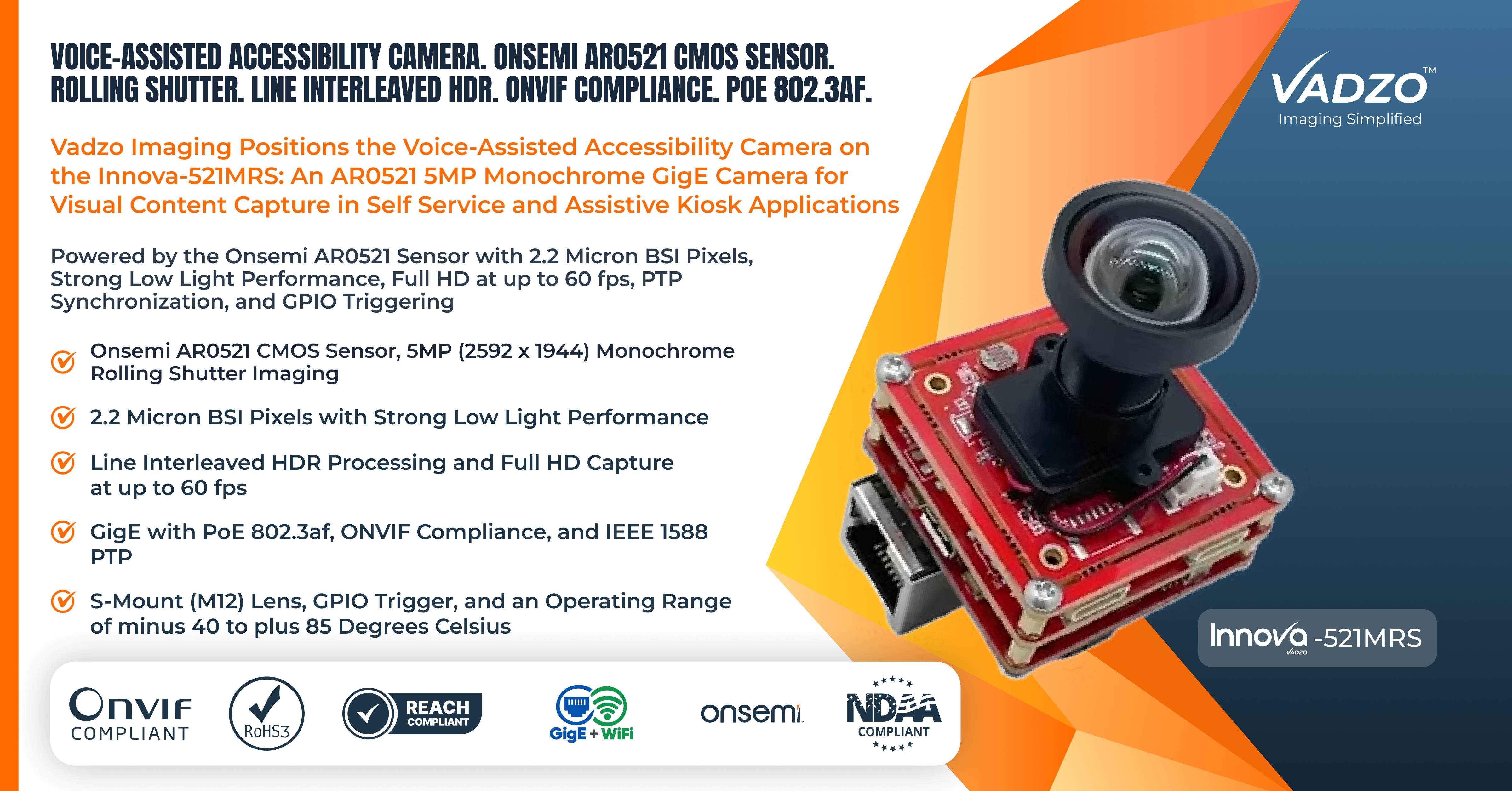
Product Overview: Voice-Assisted Accessibility Camera for Self-Service and Assistive Kiosks
The Innova-521MRS is a 5MP monochrome GigE module built on the Onsemi AR0521 sensor and positioned for visual content capture at kiosks. As a 5MP Rolling Shutter GigE Camera, it offers high resolution at reasonable cost, and as a 5MP Mono LI-HDR GigE Camera, it handles glare with line-interleaved HDR processing. The 5MP Mono Low-Light GigE Camera designation covers its back-illuminated pixels. The module also serves as an AR0521 Monochrome GigE Camera, a 5MP Mono GigE Camera, a 5MP Full HD Ethernet Camera, an AR0521 Full HD GigE Camera, an AR0521 Rolling Shutter Ethernet Camera, an AR0521 LI-HDR GigE Camera, a 5MP Line-Interleaved HDR Ethernet Camera, an AR0521 Low-Light GigE Camera, and a 5MP Mono GigE Camera Module for designs that need a standard network interface.
Key specs: 5MP (2592 x 1944) Max Resolution | Onsemi AR0521 1/2.5 inch Sensor Format | 2.2 micron BSI Pixel | Monochrome with Rolling Shutter | GigE Interface with PoE 802.3af | S-Mount (M12) Optics with Interchangeable Lens Option
Key Capabilities of the Voice-Assisted Accessibility Camera
5MP Onsemi AR0521 Sensor with 2.2 Micron BSI Pixels
The sensor records 2592 x 1944 pixels, and its 2.2-micron back-illuminated pixels collect light efficiently. In the illustrative example, 6-point characters span about 54 pixels across a 100-millimeter field. The sensor reads the image row by row, which gives high resolution and good sensitivity at reasonable cost. Teams should size the field to the items the kiosk reads and confirm the available modes.
Strong Low Light Performance
With no color filter array and back-illuminated pixels, the sensor delivers clean grayscale images in challenging lighting, such as a shaded outdoor kiosk at dusk or a dim lobby. The pixels are 2.2 microns, which is generous for 5MP, so each collects a good share of light. Even so, steady illumination of the capture area improves recognition more than any setting.
Full HD Capture at up to 60 Frames per Second
The camera captures Full HD at up to 60 frames per second, which keeps the preview smooth and lets the system catch the moment an item comes to rest. A faster frame rate also shortens the wait after a trigger. Network video is normally compressed, and teams should confirm the output formats and the bit rates for the modes they plan to use.
ONVIF Compliance
ONVIF compliance lets standard video management software and kiosk platforms discover the camera and use its video without custom code, which shortens commissioning across a fleet of machines. Teams should confirm the profiles and features they need against the product documentation.
IEEE 1588 PTP Synchronization
PTP aligns the camera clock to a network time source, so captures can be labeled with accurate time for audit logs, and units in the same kiosk can be matched. Accuracy depends on hardware timestamps and on switches that support the protocol, and teams should confirm the PTP profile and the timestamp method.
Rolling Shutter with Line Interleaved HDR Processing
The rolling shutter reads the image row by row, which suits still items held at rest. Line interleaved HDR alternates two exposure settings across the rows of one frame and combines them, so glossy reflections and dark backgrounds stay readable together, at the cost of some vertical detail. A user's moving hand can blur a frame, so a trigger on rest and a short exposure help.
GigE with PoE for Single Cable Deployment
The GigE interface carries the video, and PoE at 802.3af supplies about 12.95 watts at the device over the same cable, which simplifies installation and service. Teams should check the PoE class against the camera and any lighting that shares the supply. As an AR0521 Mono Ethernet Camera Supplier, Vadzo supports lens matching, firmware customization, and enclosure design.
S-Mount Lens with Interchangeable Option
An S-Mount (M12) lens holder accepts a wide range of lenses, and the lens is interchangeable, so a kiosk maker can choose the field of view and the working distance for the items the machine reads. The lens should be locked in place, and teams should test it with the camera, since a lens with good contrast at the pixel scale matters as much as the sensor.
GPIO for External Trigger
GPIO accepts an external signal, such as a switch or an infrared beam in the item holder, to start a capture when the item is in place. A short delay after the signal lets the item settle, and debouncing keeps one placement from producing several images. Teams should confirm the number of lines, the voltage levels, and the trigger latency, and should test the timing with the real holder and the real users.
Wide Operating Temperature Range
The camera operates from minus 40 to plus 85 degrees Celsius, which suits kiosks in cold and hot places. Sensor noise grows with temperature, so a hot enclosure raises the noise in dim scenes. Teams should confirm the range in the product documentation and keep the camera as cool as the enclosure allows.
"A voice that reads a kiosk to the user is only as good as the picture it reads from. The Innova-521MRS was positioned to supply that picture, with a monochrome sensor that keeps text sharp, line-interleaved HDR for glare, a trigger input that waits for the item to be in place, and a single cable for power and video. We are plain about the limits. The camera does not read or speak, so recognition and voice quality belong to the kiosk maker; glare and a moving hand can still defeat any sensor, and the details should be confirmed in the documentation. We help customers set up the field, the lighting, and the trigger before they build the enclosure." - Alwin Vincent, Product Manager, Vadzo Imaging.
Application for Visual Content Capture at Self-Service and Assistive Kiosks
Self Service Kiosks
Transit, retail, and government kiosks read tickets, forms, and cards. The Innova-521MRS works as a Self-Service Kiosk GigE Camera that captures a clean image when the item is at rest, with ONVIF letting the kiosk platform use it like any network camera. Teams should size the capture field to the largest item and the smallest print they expect, and should keep a record of how often a first attempt fails, since retries are the best measure of how well the whole chain works.
Assistive and Accessibility Kiosks
Machines for blind and low-vision users guide them by voice. The camera serves as an Assistive Kiosk GigE Camera and an Accessibility Kiosk GigE Camera whose images feed recognition and speech software, and the voice prompts tell the user where to place the item and whether the capture worked. The kiosk maker remains responsible for meeting accessibility rules and for testing with real users, including people who are blind or have low vision, since only they can judge whether the guidance is clear.
Voice Assisted Content Capture
The full chain runs from a trigger to a capture to recognition to speech, and each step must be reliable. The module functions as a Voice-Assisted Kiosk Ethernet Camera and a Visual Content Capture GigE Camera that delivers the image for the middle of that chain. Personal data on printed items belongs to the user, and the operator is responsible for how it is processed and deleted. A good design keeps only what the task needs, deletes the image as soon as the text is read, and tells the user, by voice, what the machine will and will not keep.
Frequently Asked Questions
Q: What does a camera do in a voice-assisted kiosk?
A: Vadzo Imaging explains that the camera captures an image of a printed item or a screen, such as a ticket, a label, or a card. Recognition software then turns the image into text, and a speech system reads the text aloud. The camera does neither of those last steps, so the quality of the image decides how well the rest works. A monochrome sensor keeps small characters sharp, which helps recognition, and a 5MP Monochrome Ethernet Camera supplies plenty of pixels for small print at a typical kiosk distance.
Q: How many pixels does a character need for recognition?
A: Most recognition software reads reliably when a character is at least about 20 to 30 pixels tall. For example, over a field 100 millimeters wide across 2592 pixels, each pixel covers about 39 microns, so 6-point print, about 2.1 millimeters tall, spans about 54 pixels. Over the 297 millimeters of an A4 page, it spans only about 18. Vadzo Imaging recommends sizing the field to the items the kiosk reads.
Q: How can a kiosk camera avoid glare from glossy paper?
A: Glare from a lamp can hide the characters beneath it. Line interleaved HDR keeps bright and dark regions readable together, and optical measures reduce the reflection before it reaches the sensor, such as diffuse lighting, a matte background, a slight tilt of the item holder, or a polarizing filter. Vadzo Imaging suggests testing with the glossiest items the kiosk will meet, under the real lamps, and a 5MP Mono LI-HDR GigE Camera should be compared with the mode on and off.
Q: Why trigger a capture instead of streaming continuously?
A: A user's hand moves while it positions an item, and a moving hand blurs the image. For example, at 0.2 meters per second, a 5-millisecond exposure moves the item 1 millimeter, about 26 pixels at 39 microns per pixel. A trigger from a switch or a beam in the holder tells the camera that the item has arrived, and a short delay lets it settle. Vadzo Imaging recommends debouncing the signal and testing with real users, and the trigger should wait a short moment after the item is detected so that the hand has left the frame.
Q: Why should kiosk makers choose Vadzo Imaging as their 5MP mono Ethernet camera supplier?
A: Vadzo Imaging offers more than a camera module built around a capable sensor. Kiosk makers receive a monochrome GigE camera with PoE, ONVIF, PTP, line interleaved HDR processing, and a GPIO trigger, with candid guidance on glare, motion, lenses, and the details to confirm in the documentation, plus engineering support for lens selection, firmware customization, and enclosure design. Vadzo Imaging maintains evaluation kits with no minimum order requirement, so teams can test in their own enclosure before committing to volume production.
Availability
The Innova-521MRS Voice-Assisted Accessibility Camera, built on the Onsemi AR0521 sensor, is available now for evaluation and production orders. Evaluation kits include the camera, an S-Mount lens, and platform documentation, with no minimum order requirement. Kiosk teams can test text capture with their own items and lighting, compare line interleaved HDR on and off under their own lamps, and try the GPIO trigger with their own item holder before committing to a production bill of materials, which tells them more than a datasheet comparison alone. Teams that need a different lens or configuration can ask Vadzo to review the setup. Browse the full range of network camera options at Vadzo's website or contact Vadzo at [email protected] to request an evaluation unit or discuss OEM integration requirements.
About Vadzo Imaging
Vadzo Imaging is a global provider of embedded vision solutions and delivers high-performance camera technologies and imaging platforms for applications in robotics, industrial automation, UAVs, edge AI, and medical systems. Its products are designed for seamless integration with leading embedded platforms. Vadzo supports customers through hardware customization, firmware development, and module-level drivers, enabling faster development and deployment of vision based systems across GigE, USB, MIPI, Wi-Fi, and SerDes camera interfaces.
Media Contact
Alwin Vincent
Vadzo Imaging
Email: [email protected]
LinkedIn: Vadzo Imaging
YouTube: Vadzo Imaging
X: Vadzo Imaging
SOURCE: Vadzo Imaging